
How to Deposit and Withdraw on JJ99 Game 2026 — Complete Pakistan Guide
Managing your money on JJ99 Game is one of the most important things to understand before you start playing. Whether you want to add funds to your gaming wallet or cash out your hard-earned winnings this complete guide walks you through every single step clearly and simply. JJ99 Game fully supports JazzCash and Easypaisa he two most trusted and widely used mobile payment methods across Pakistan making every transaction fast, secure, and completely hassle-free.
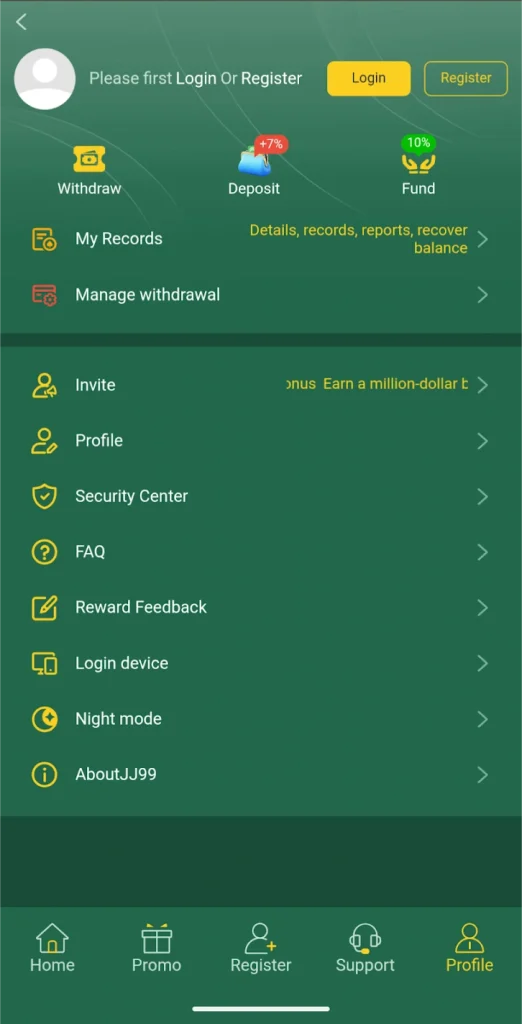
Everything You Need to Know Before Depositing
Before you make your very first deposit on JJ99 Game there are a few important things worth knowing. Understanding these basics will save you time and help you avoid any common mistakes that new players often make.
Minimum and Maximum Deposit Limits
| Transaction Type | Minimum Amount | Maximum Amount |
|---|---|---|
| JazzCash Deposit | PKR 100 | PKR 50,000 |
| Easypaisa Deposit | PKR 100 | PKR 50,000 |
| Bank Transfer Deposit | PKR 500 | PKR 100,000 |
| JazzCash Withdrawal | PKR 300 | PKR 50,000 |
| Easypaisa Withdrawal | PKR 300 | PKR 50,000 |
| Bank Transfer Withdrawal | PKR 500 | PKR 100,000 |
Supported Payment Methods
JazzCash — Pakistan’s most widely used mobile wallet. Instant deposits and fast withdrawals available 24 hours a day 7 days a week.
Easypaisa — Secure and completely reliable mobile payment method trusted by millions across every region of Pakistan.
Bank Transfer — Direct transfer from your personal Pakistani bank account. Best suited for larger deposit or withdrawal amounts.
How to Deposit Money on JJ 99 Game 2026
Adding money to your JJ99 Game wallet is quick, safe, and designed to be beginner-friendly. Follow these steps carefully for a smooth and completely successful deposit every time.
Open the App and Login
Launch JJ99 Game on your Android, iOS, or PC device and log in using your registered mobile number and password. Make sure your internet connection is stable before proceeding.
Go to the Wallet Section
After logging in tap the Wallet icon or button on the main home screen. This is usually located at the top right corner or bottom navigation bar of the app depending on your device.
Select Deposit
Inside the Wallet section tap the Deposit or Add Money option. A list of available payment methods will appear on your screen.
Choose Your Payment Method
Select your preferred payment method from the available options:
- JazzCash — For fast and instant deposits
- Easypaisa — For secure and reliable deposits
- Bank Transfer — For larger deposit amounts
Enter the Deposit Amount
Type in the exact amount you want to add to your JJ99 Game balance. Make sure the amount falls within the minimum and maximum limits for your chosen payment method. You can also select from preset quick-amount buttons if available.
Select a Promotion (Optional)
New players will see a list of available deposit promotions at this stage. If you are making your first deposit select the Welcome Bonus promotion to receive a matching bonus on top of your deposited amount. Regular players can choose from daily deposit bonuses or other active promotions available at the time.
Confirm and Complete Payment
Tap the Confirm or Pay Now button. You will be redirected to your JazzCash or Easypaisa app to approve the payment. Enter your mobile wallet PIN or password to authorise the transaction.
Check Your Balance
After successful payment return to JJ99 Game. Your updated balance will appear in your wallet within just a few seconds. You are now fully ready to start playing and earning on the platform.
Pro Tip: Always take a screenshot of your payment receipt immediately after completing a deposit. This screenshot serves as proof of transaction if any issue ever arises.
How to Deposit via JazzCash on JJ999 Game
JazzCash is the fastest and most popular deposit method on JJ99 Game across Pakistan. Here is exactly how to use it.
JazzCash Deposit Steps
Open JJ99 Game and go to Wallet then Deposit. Select JazzCash from the payment method list. Enter the amount you want to deposit. Tap Confirm to proceed. Your JazzCash app will open automatically requesting payment approval. Enter your JazzCash PIN to authorise the transaction. The deposit is confirmed and your JJ99 Game balance updates instantly.
Processing Time: Instant — your balance appears within seconds. Available: 24 hours a day 7 days a week including public holidays.
How to Deposit via Easypaisa on JJ99 Game
Easypaisa is another fast and completely secure option for funding your JJ99 Game account directly from your mobile wallet.
Easypaisa Deposit Steps
Open JJ99 Game and navigate to Wallet then Deposit. Choose Easypaisa as your preferred payment option. Enter your desired deposit amount in the field provided. Tap the Confirm button to initiate the transaction. Open your Easypaisa app and approve the incoming payment request. Enter your Easypaisa PIN to complete the authorisation. Your JJ99 Game balance will update within a few seconds of confirmation.
Processing Time: Instant to 2 minutes maximum. Available: All hours of the day including weekends and public holidays.
How to Deposit via Bank Transfer on JJ999 Game
For players who prefer using their personal bank account directly this option provides a reliable and secure way to add larger amounts to your JJ99 Game wallet.
Bank Transfer Deposit Steps
Go to Wallet then Deposit and select Bank Transfer. Choose your bank from the list of supported Pakistani banks. Enter the exact deposit amount you want to transfer. Note down the recipient account details displayed on screen. Open your banking app or visit your bank and initiate the transfer to the provided account details. Upload your payment receipt or transaction screenshot inside the JJ99 Game app as proof. The deposit will be manually verified and credited to your account within a few hours.
Processing Time: 30 minutes to 4 hours depending on your bank. Recommended For: Larger deposits above PKR 10,000.
How to Withdraw Money from JJ 99 Game 2026
Withdrawing your hard-earned winnings from JJ99 Game is just as simple as depositing. The platform processes most withdrawal requests quickly so your money reaches your mobile wallet without unnecessary delays.
Step 1 — Open the App and Login
Launch JJ99 Game and log in to your registered account. Ensure you have a stable internet connection throughout the withdrawal process.
Step 2 — Check Your Available Balance
Before requesting a withdrawal check your current wallet balance to confirm you have enough funds to meet the minimum withdrawal requirement. Also make sure you have completed any required wagering conditions attached to bonus funds.
Step 3 — Go to Wallet and Select Withdraw
From the main screen tap Wallet and then select the Withdraw option. The withdrawal section will open with all available payout methods displayed clearly.
Step 4 — Choose Your Withdrawal Method
Select your preferred withdrawal destination:
- JazzCash — Fastest option for most players
- Easypaisa — Equally fast and secure alternative
- Bank Transfer — Best for larger withdrawal amounts
Step 5 — Enter Your Withdrawal Amount
Type the exact amount you want to withdraw. Make sure it meets the minimum withdrawal limit for your chosen method. Double-check the amount carefully before proceeding to the next step.
Step 6 — Enter Your Payment Account Details
Provide your registered wallet or bank account details accurately:
For JazzCash — Enter your JazzCash registered mobile number. For Easypaisa — Enter your Easypaisa registered mobile number. For Bank Transfer — Enter your full bank account number, account name, and bank branch details.
Important: Always use the same payment account that you used for your deposits. Withdrawals to unverified or different accounts may face delays or rejection.
Step 7 — Enter Your Transaction Password
Some users are required to enter a transaction password or PIN as an additional security step. If prompted enter your transaction password carefully to authorise the withdrawal request.
Step 8 — Submit and Confirm
Tap the Submit or Withdraw Now button to send your request. A confirmation message will appear on screen. Keep this confirmation reference number safe for your records.
Step 9 — Receive Your Money
Your withdrawal will be processed and the money will arrive in your JazzCash or Easypaisa wallet within the processing time for your chosen method. You will receive an SMS confirmation from your wallet provider once the transfer is complete.
Pro Tip: Always take a screenshot of your withdrawal confirmation screen. This is helpful if you ever need to follow up with customer support about a pending payout.
Withdrawal via JazzCash on JJ99 Game
JazzCash Withdrawal Steps
Go to Wallet then Withdraw and select JazzCash. Enter the withdrawal amount carefully. Type your registered JazzCash mobile number. Enter your transaction PIN if prompted. Tap Submit to send the withdrawal request. Money arrives in your JazzCash wallet within minutes.
Processing Time: 3 to 10 minutes on average. SMS Confirmation: Yes — JazzCash sends you a confirmation SMS.
Common Deposit and Withdrawal Problems and Solutions
Even on a reliable platform occasional issues can arise. Here are the most common problems players face and exactly how to resolve them quickly.
Deposit Not Showing in Balance
Problem: You completed the payment through JazzCash or Easypaisa but your JJ99 Game balance has not updated.
Solution: Wait at least 5 minutes and then refresh your wallet page. Check your JazzCash or Easypaisa transaction history to confirm the payment was actually deducted. Take a screenshot of your payment receipt and contact JJ99 Game support through live chat or WhatsApp with the screenshot as proof. The support team will manually verify and credit your balance within a short time.
Withdrawal Taking Too Long
Problem: Your withdrawal request was submitted but the money has not arrived in your mobile wallet after the expected time.
Solution: Check the processing time for your chosen withdrawal method. Make sure you entered the correct wallet number during your withdrawal request. Take a screenshot of your withdrawal confirmation and contact customer support with the reference number provided at the time of submission. The support team will investigate and resolve pending withdrawals promptly.
Incorrect Account Details Entered
Problem: You accidentally entered the wrong JazzCash or Easypaisa number when submitting a withdrawal.
Solution: Contact JJ99 Game customer support immediately through live chat or WhatsApp. Provide your withdrawal confirmation screenshot and explain the situation clearly. The support team will attempt to cancel and reprocess the withdrawal to the correct account details.
Withdrawal Rejected
Problem: Your withdrawal request was rejected by the system.
Solution: Check whether you have met the minimum withdrawal amount requirement. Verify that any bonus funds attached to your balance have completed the required wagering conditions. Make sure your account is fully verified with the correct details on file. Contact support if the rejection reason is unclear and the team will explain exactly what needs to be resolved.
Important Tips for Smooth Deposits and Withdrawals
Following these simple habits will make every financial transaction on JJ99 Game faster and completely hassle-free.
Always use your own verified personal payment accounts for all transactions. Never use someone else’s JazzCash or Easypaisa account for deposits or withdrawals. Always double-check the amount and account number before confirming any transaction. Keep screenshots of every deposit receipt and withdrawal confirmation you make. Withdraw your winnings regularly rather than letting them accumulate for long periods. Contact support immediately if any transaction behaves unexpectedly rather than waiting. Avoid making multiple rapid withdrawal requests at the same time.
Deposit and Withdrawal Processing Times Summary
| Method | Deposit Time | Withdrawal Time |
|---|---|---|
| JazzCash | Instant | 3 to 10 minutes |
| Easypaisa | Instant to 2 minutes | 3 to 15 minutes |
| Bank Transfer | 30 minutes to 4 hours | 1 to 24 hours |
Customer Support for Payment Issues
If you ever face any deposit or withdrawal issue the JJ99 Game customer support team is available 24 hours a day 7 days a week to help you resolve it quickly and professionally.
Live Chat
The fastest way to get help. Open the app and tap the Support or Chat icon to connect with a support agent in real time. Most payment issues are resolved within the same chat session.
WhatsApp Support
Message the official JJ99 Game WhatsApp support number with your issue, your account mobile number, and a screenshot of the relevant transaction. The team responds quickly and follows up until your issue is fully resolved.
Email Support
For detailed or complex payment issues that require formal documentation send an email to the official JJ99 Game support address. Include your account details, transaction reference number, and a clear description of the problem for the fastest possible resolution.
Final Words
Depositing and withdrawing on JJ99 Game is genuinely one of the smoothest and most straightforward financial experiences available on any online earning platform in Pakistan today. With full support for JazzCash, Easypaisa, and bank transfers and processing times that are among the fastest in the industry players never have to wait long to access their funds.
By following the complete step-by-step guides in this article you can handle all your JJ99 Game financial transactions with complete confidence and without any confusion. Always keep your payment details accurate, save your transaction screenshots, and reach out to support immediately if anything does not go as expected.
Play smart, earn consistently, and always withdraw your winnings regularly to keep your money safe and accessible at all times.